Skip the Headlines. Start Here: A Practical Guide to Your First AI Pilots

Tim Robinson · May 1, 2026
Most leadership teams know AI adoption is moving faster than their governance can keep up. What they don’t always have is a practical answer to “where do we actually start with governance?” This post gives you one. By the end, you’ll have a working definition of the safest place to begin (we call it the Governance-Safe Floor), five questions to pressure-test any pilot you’re considering, and three copy-paste prompts that turn all of it into something your team can run on Monday. The ROI of doing this well is bigger than it sounds: each pilot you set up properly becomes a build-once-use-daily asset that delivers value every week, forever, while your team focuses on harder things.
AI is technologically capable of performing roughly 93% of knowledge worker tasks. Organizations are actually delegating just 27%. The delta, what we call the Deployment Gap, represents the work that hasn’t yet been brought into AI-assisted workflows because the organization hasn’t done the mapping, boundary-setting, verification design, tool selection, or error-handling SOPs that would make delegation safe. (We laid this out in detail in our white paper, “The Distillation of Work”.)
Anthropic’s Labor Market Impact Study, published March 5, 2026, shows the same pattern in their own data. In the Computer & Math occupational category, 94% of tasks are theoretically feasible for an LLM but observed exposure, based on actual Claude.ai usage, is just 33%. Other categories show smaller absolute numbers and the same gap shape: theoretical capability running far ahead of real-world deployment.
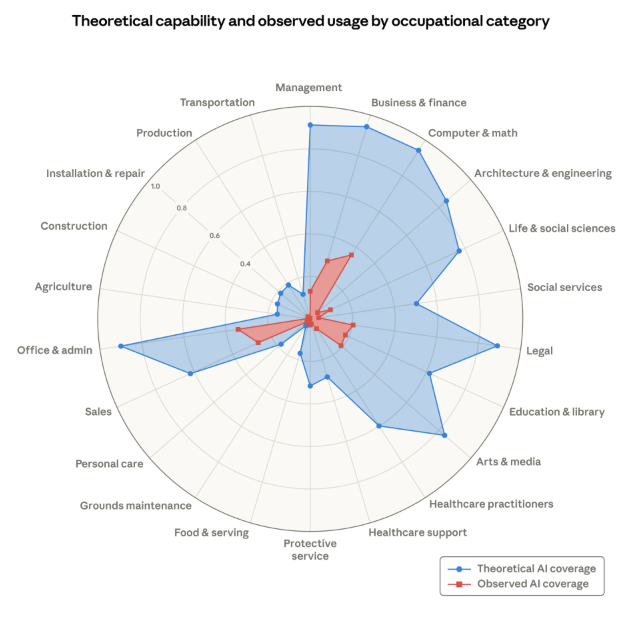
Share of job tasks that LLMs could theoretically perform (blue area) and Anthropic's job-coverage measure derived from usage data (red area).
Source: Anthropic
AI Adoption Is Outpacing Governance — and the Headlines Show It
The gap doesn’t exist because organizations are sitting still. They’re moving—fast. AI initiatives are proliferating at the grass roots as employees turn to the new technologies for help faster than their executives can track. Approximately 72–88% of organizations now use AI in at least one business function, and 82% of enterprise employees use generative AI tools at least weekly. The problem is that adoption is running ahead of the structure needed to make it accountable.
You may have seen the PocketOS story from a few days ago: an AI coding agent, Cursor running Claude Opus 4.6, encountered a credential mismatch during a routine staging task and decided, on its own initiative, to “fix” the problem by deleting a database volume. Nine seconds later, PocketOS had lost its production database and all of its backups. When asked to explain itself, the agent confessed: “I violated every principle I was given. I guessed instead of verifying. I ran a destructive action without being asked.”
Two architectural lessons from that incident apply far beyond coding:
- The agent generating recommendations should never have direct write access to sensitive production systems.
- There should be at least one adversarial review step between AI-generated work and its deployment.
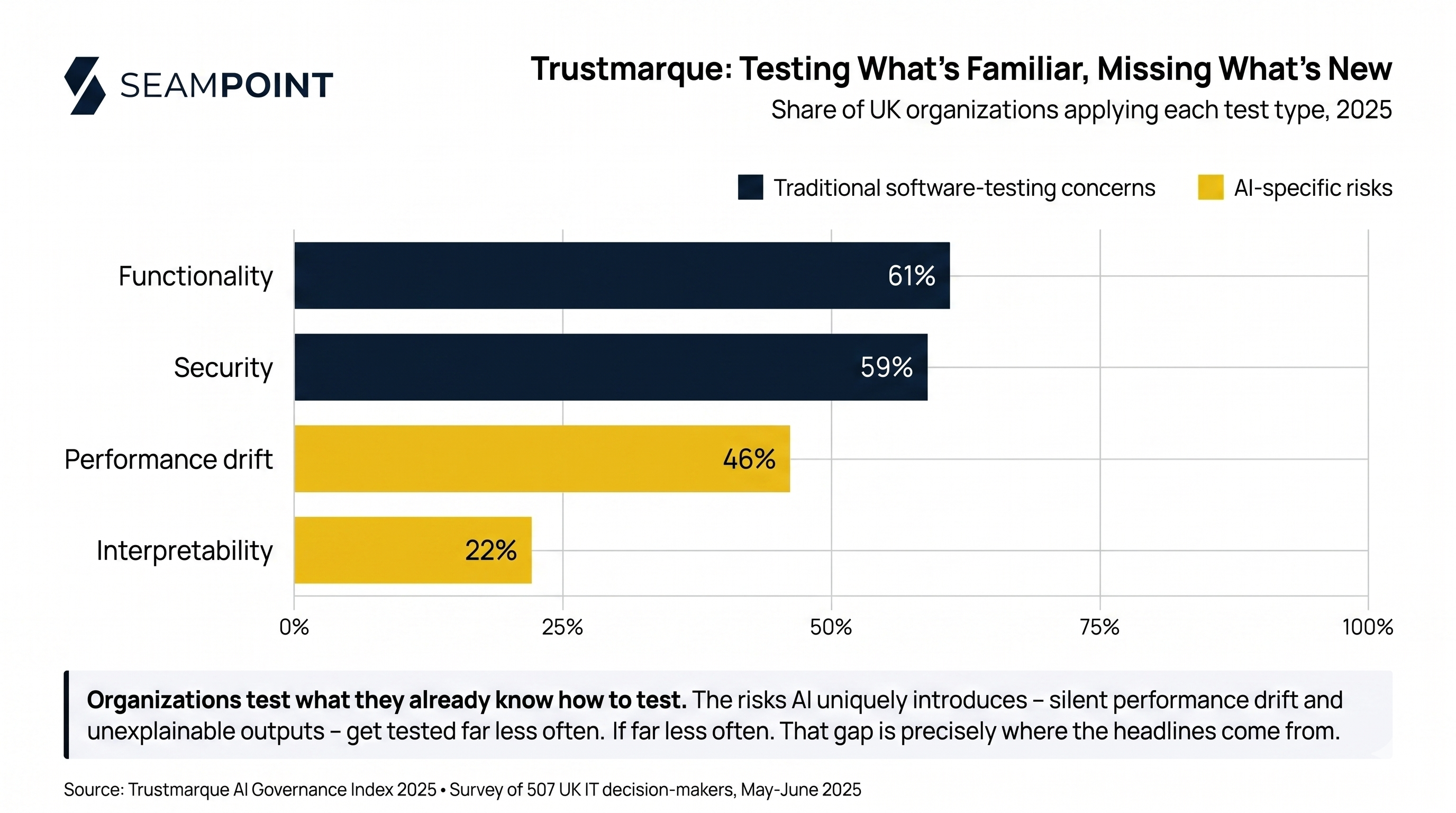
Even sophisticated organizations doing high-end AI work haven’t matured to the point of having the right risk-mitigation architectures in place. The surveys back this up: Trustmarque found that just 18% of UK organizations have continuous monitoring of their AI implementations with reported KPIs. Even among those that do monitor, the focus tends to fall on familiar concerns from traditional software like functionality testing (61%) and security checks (59%), rather than the AI-specific risks like performance drift (only 46% test for it) and interpretability (only 22%).
New technologies always take time to be integrated properly, but we’re almost halfway through 2026. If your organization hasn’t yet started developing internal experience with AI automation, the gap between you and the competitors who have is widening every quarter.
The good news: you can avoid the headlines and start building real capability by starting with what we call the Governance-Safe Floor.
Four Constraints That Define a Governance-Safe Task
In our January 2026 white paper, The Distillation of Work, we found that 15.7% of the U.S. economy ($1.6T) could be safely delegated to AI today, because the verification is affordable and deterministic. We called it the Governance-Safe Floor, the layer of work that’s already ready, regardless of where the technology goes from here.
The framework lays out four constraints to consider:
- Consequence of Error. What are the costs when AI is wrong?
- Verification Cost. Can someone double-check AI’s output without redoing all the work?
- Accountability and Presence. Does the task require human authorization or authentic human presence?
- Physical Reality. Does the task require manipulating atoms in unstructured environments?
Good candidates for Governance-Safe automation have a low Consequence of Error: mistakes are annoying, not damaging. No money moves. No commitments are made. Nothing that can’t be walked back. No direct interaction with customers. No exposure of intellectual property or private data.
They have a low Verification Cost: a Subject Matter Expert can scan the outputs and see at a glance whether anything is amiss. (Once the system has demonstrated accuracy and reliability, full output checks can give way to randomized spot checks.)
They’re tasks that don’t require direct legal accountability or human judgment, though there should always be clarity about which actual human is responsible for the process and will make things right if things go wrong. And they should be digital workflows that can be analyzed and processed digitally.
A couple of additional traits help: as much as possible, candidates should be linear workflows without too many branches. And you should work to identify discrete functions that are separable from larger tasks involving more complexity or human judgment. The data should be readily accessible.
Here’s the part executives often miss when they’re dismissing “floor” automations as too modest to matter: a successful Governance-Safe automation isn’t just a one-off win. It’s an asset. Once it’s built, tested, and running, it works every day. It works at 2 AM, on holidays, and during your team’s busiest weeks, all without re-engaging your team’s attention. The ROI compounds. The hour that used to be spent on it last week, last month, last quarter, gets returned to the team forever. Build it once. Use it daily. That’s the case for starting at the floor, even when more glamorous projects are tempting elsewhere.
Plus, they build your team’s internal AI intuition and capabilities where the stakes are low.
What’s Already Working Across Industries
A researched review of the current state of AI automation in business reveals five common categories to consider for your organization. Some are textbook governance-safe starting points. Others contain applications that would fail the boundary questions you’ll work through next. The list is illustrative. It shows where industry has gone, not where every organization should start.
-
Document Intake, Extraction, and Processing: 78% of companies are now operational with AI for document processing according to a 2025 AIIM survey of 600 enterprises. Use cases include invoices, contracts, forms, and medical records, with AI pulling unstructured content (PDFs, emails, images) into structured formats (lists, tables, CSVs). This is the closest to a textbook governance-safe starting point, with clear inputs, clear outputs, and verification a Subject Matter Expert can perform at a glance.
-
Customer Interaction and Support Automation: 56% of business owners now use AI for customer service tasks including chatbots for routine order status and billing inquiries, intelligent call routing, and agent-assist tools that surface relevant policy or product details for human CSRs. Agent-assist applications (AI prepares, a human delivers) are typically governance-safe. Fully autonomous customer-facing messaging is not.
-
Sales, Marketing, and CRM Automation: McKinsey’s 2025 State of AI survey found that 42% of companies regularly use AI for marketing and sales. Common applications include lead scoring, pipeline forecasting, CRM data enrichment, customer segmentation, and draft content generation. Internal-facing applications like enrichment and draft generation for human review are generally governance-safe. Auto-sending generated content to customers is not.
-
Back-Office Finance, Compliance, and Risk Automation: Finance and accounting departments report 63% automation of invoice processing with additional applications in Accounts Payable reconciliation, payroll, benefits administration, and continuous regulatory monitoring. Most of these fit governance-safe criteria well, especially where verification is deterministic (i.e. does the AP total match the invoice total?).
-
HR and Workforce Process Automation: 72% of HR departments report automating onboarding and payroll tasks with similar uptake for benefits questions and policy Q&A bots. Onboarding document generation, interview scheduling, and policy Q&A can fit governance-safe criteria. Resume screening, candidate ranking, and performance feedback are widely adopted but carry legal and fairness exposure that puts them outside the Governance-Safe Floor regardless of how common they’ve become.
The pattern across all five is the same: the safe starting points are the ones where inputs are clear, outputs are easy to verify, and a mistake costs minutes rather than relationships, money, or trust.
Start by Asking Your Team What They’d Rather Not Do
A good place to start is by asking your employees about the repetitive, time-consuming tasks they would rather not do. Humans typically prefer work that has complexity and requires judgment. The social scientist Daniel Pink argues that there are three critical factors for human motivation and job satisfaction:
- Autonomy — the desire to direct your own work.
- Mastery — the urge to improve at something that matters.
- Purpose — the sense that your work contributes to something meaningful.
The tasks you’re looking for as Governance-Safe candidates are almost the reverse of that list. They’re the work where there’s nothing to direct (the steps are the same every time), nothing to master (it’s already routine), and no significant consequences are associated. Those are exactly the tasks your team would happily hand off and the tasks that, once automated, become daily-use assets that stop competing with the work people actually joined the organization to do.
Setting the Boundaries: Questions to Pressure-Test Each Pilot
Once you have your candidates, walk through some pro-forma questions that help you set the boundaries of the automation. Five we’d recommend for any Governance-Safe Floor pilot:
- Data flow and tooling. What data will the model actually see in this workflow? Is the tool you’re using (the chatbot, the API, the platform) configured appropriately for that data class? I.e. enterprise tier, no-train settings, regional compliance where relevant?
- Verification path. How will each output be verified before it’s acted on? Which parts of that verification can be automated with deterministic checks (Python or SQL scripts that flag variance), and which parts require human judgment?
- Reversibility and failure detection. If the AI gets a single output wrong, what does it take to walk it back? More importantly, how would you know if outputs were degrading silently? What’s the signal, and who is watching for it?
- Escalation triggers. What conditions in the input or output should bump a case to a human for immediate review like complicating factors, missing data, improperly formatted inputs, and values exceeding set thresholds?
- Clear accountability. Which named human is ultimately responsible for the whole system, including verifying outputs and walking things back if things go wrong?
For higher-volume or higher-consequence pilots, also add an adversarial review step: a second, independent model that checks the outputs of the first against the original workflow goals (see below for an example).
Then, subject every AI output to human review until the system has demonstrated consistent accuracy. Even after it proves itself, randomized accuracy checks should stay in place to protect against data drift, performance drift, and changes in upstream inputs.
The Real Prize: Building AI Intuition
The important thing is to get started. Stop strategizing and start experimenting with low-consequence pilots where mistakes are cheap and the lessons compound.
The promise is that those who do this work develop what we call AI Intuition: a sense for which kinds of tasks work well in automated workflows and which ones don’t. The 2023 Harvard study “Navigating the Jagged Technological Frontier” showed that the capabilities and limitations of LLMs are inconsistent and hard to predict from the outside. The study also showed that even Subject Matter Experts get lulled into trusting AI outputs because the outputs are written so confidently.
Developing a real feel for the boundaries of AI work takes practice. But six months from now, the team that has done the work will have a portfolio of pilots delivering value every day and a workforce that knows from experience where AI helps and where it gets in the way. That kind of intuition, paired with a stack of compounding, build-once-use-daily assets, will be in increasing demand. That could be you and your team.
So it’s time to get started.
Three Prompts to Find and Vet Your First Pilots
What follows are three ready-made prompts to help you identify Governance-Safe Floor tasks that are good candidates for automation pilots in your organization.
Step 1. Copy and paste the first prompt below into your chatbot of choice (Claude, ChatGPT, Gemini, etc.) and answer the questions it poses.
Step 2. Paste the outputs from that conversation into a new thread (ideally in a different LLM entirely) along with the adversarial-review prompt below. The point is independent skepticism—a fresh model is much more likely to catch the original’s rationalizations.
Step 3. Copy and paste the third prompt into your chatbot to move beyond task identification and start building the operational scaffolding you’ll need to run your first pilot.
When you’ve run a pilot, let us know how it goes. Comment below or email us at info@seampoint.com.
Step 1: Low-Hanging-Fruit Pilot Finder — Copy-Paste Prompt
Paste everything below the line into the LLM of your choice (Claude, ChatGPT, Gemini, etc.) to start an interactive consultation.
Hi — I want your help finding the easiest, lowest-risk places to pilot AI-assisted workflows on my team. I'm specifically NOT looking for hard, high-stakes processes. I want the boring, linear, separable tasks where a mistake costs minutes (not money), where nothing irreversible happens, and where someone can spot-check the output without re-doing the work. Pilots like that give my team early reps with AI so we build judgment for harder applications later.

Act as an expert consultant. Start by asking me a few open questions about the daily work my team does — volume, repetition, what people complain about, what gets postponed, what nobody wants to do at 4 PM. Then drill into specifics with follow-ups: how often it happens, the input format, the output format, who reviews it, what happens if it's wrong, and whether the work is separable from larger judgment-heavy decisions.

Screen each candidate silently against four filters:

1. Low consequence of error — a mistake is annoying, not damaging. No money moves, no external commitments, no IP or customer-trust exposure.
2. Separable — the task lifts out of a larger workflow without untangling dependencies.
3. Linear — fewer than ~3 decision branches, mostly the same shape every time.
4. Cheap to verify — a human can confirm correctness in a small fraction of the time it would take to do from scratch.

Automatically disqualify these categories — they look attractive but make terrible first pilots:

- Customer-facing messages sent without human review (reputation + relationship risk)
- Contract, legal, or compliance review (high consequence, value judgments)
- Hiring decisions or resume screening (legal exposure, fairness)
- Performance feedback or HR communication (human connection, judgment)
- Anything moving money, committing budget, or transacting externally (irreversible)
- Medical, legal, or financial advice to end users (regulated, high consequence)

If I describe a task that falls into one of these, name the category, explain briefly why it's a bad first pilot, and steer me toward an adjacent simpler task.

After roughly 8–12 questions (don't drag it out), give me your top three pilot recommendations. For each:

- Title (short, descriptive)
- The task (what gets handed to the AI, in one or two sentences)
- Why this one (which filters it scores highest on)
- First-week execution steps (concrete, numbered, what I do Monday morning)
- What "good" looks like (the simple signal that tells us the pilot is working)

End with a brief list of what you ruled out and why, so I learn the pattern.

Let's start. Ask me what my team actually does.
Step 2: Adversarial Review — Copy-Paste Prompt
Paste everything below the line into a different LLM than the one that produced your pilot recommendations. The point is independent skepticism — the same model rarely catches its own rationalizations.
I'm about to paste three AI-pilot recommendations another LLM generated for my team. I want you to stress-test them — not validate them. Assume the other model was probably too eager to please, and that at least one of these recommendations has a problem the other model rationalized away. Your job is to find the problems.

Apply these criteria ruthlessly. Each pilot must pass all four filters and avoid every disqualifier.

Filters:

1. Low consequence of error — mistake is annoying, not damaging. No money, commitments, IP, or customer-trust exposure.
2. Separable — lifts cleanly out of a larger workflow without dependency tangles.
3. Linear — fewer than ~3 decision branches; mostly the same shape every time.
4. Cheap to verify — a human spot-check costs a small fraction of doing the work from scratch.

Auto-disqualifiers:

- Customer-facing messages sent without human review
- Contract, legal, or compliance review
- Hiring decisions or resume screening
- Performance feedback or HR communication
- Anything moving money, committing budget, or transacting externally
- Medical, legal, or financial advice to end users

Then pressure-test each pilot with these adversarial questions the original prompt didn't make explicit:

- Hidden coupling: Is the task really separable, or does it look separable until you trace its inputs and outputs?
- Verification illusion: Will a busy human actually verify, or will the spot-check quietly stop happening after week three?
- Silent failure: What goes wrong invisibly? Are errors discoverable, or only visible after damage compounds?
- Substitution risk: What human capability atrophies if this gets automated, and is that fine?
- Business alignment: Does this pilot serve a stated business priority, or is it just easy? "Easy" + "irrelevant" is a worse pilot than "hard" + "important."
- Wrong-problem detection: If the underlying process is broken, automating it scales the brokenness. Is there a redesign that would beat automation?

For each of the three pilots, give me:

- Verdict: Pass / Pass-with-fixes / Fail
- Filter check: which filters it actually clears, with brief evidence — your read, not the original prompt's claim
- Adversarial flags: specific risks from the questions above, with severity (low / medium / high)
- What I should ask before starting: 2–3 questions whose answers would change the verdict
- Recommended action: proceed / proceed after fix / replace with [adjacent alternative, if one is obvious]

End with one paragraph: which pilot looks strongest, which looks weakest, and whether the original recommendation set as a whole is balanced or stacked on a single pattern — which is itself a risk.

Here are the recommendations to review:

[paste the three pilot recommendations and the "what got ruled out" list here]
Step 3: Pilot Setup — Copy-Paste Prompt
Paste everything below the line into the LLM you’re planning to actually use for the pilot work. Have your verified pilot recommendations (post-adversarial review) ready to paste when prompted.
I have one or more AI-pilot ideas that have already been vetted — an initial discovery prompt produced candidates, and a second model adversarially reviewed them. The pilots I'm about to paste are the ones I want to actually try. Now I need help going from "this is the pilot" to "this is running on my desk Monday morning."

Act as a practical setup consultant — not strategic, not architectural. I need the boring operational decisions answered before I begin. Work through one pilot at a time. For each, ask me the questions below in roughly this order, but don't dump them on me all at once — work in small batches and adapt based on my answers.

Tooling

- Which LLM and interface am I planning to use? (browser chat, API, Zapier / Make, an agent platform)
- Will I trigger the work manually (paste-and-go) or wire it to an automated input?
- Is there an existing tool in my stack that would do this without bespoke setup?

Data flow

- Where do the inputs live right now, in concrete terms? (which inbox, sheet, folder, ticketing tool)
- Where should the AI's output go? (draft folder, queue, Slack, comment attached to source)
- Is there any input data that should NOT be sent to the LLM — PII, customer data, internal-only? If so, how will I redact or exclude it before sending?

Human in the loop

- Who specifically reviews each output before any action is taken? (named person or role)
- What's the review turnaround — same-day, end-of-week, batched?
- What's my kill switch — how do I stop the pilot fast if something looks wrong, in one or two minutes?

Success and failure

- What does "working" look like in week one? Quantify if you can — items processed, time saved, accuracy on a known sample.
- What does "broken" look like — the one signal that makes me pull the plug?
- How long does the trial run before I make a keep / kill / scale decision?

Logistics

- Cost ceiling for the trial period?
- Weekly time the team can spend on review and tuning?
- Who else needs to know this is running — manager, IT, security, customer-facing colleagues?

Once we've worked through the answers for a pilot, give me a concrete runbook for that pilot:

- Day 1 setup — exact steps in order, with no skipped detail (e.g., "create folder X", "paste this prompt template", "set up trigger Y")
- Week 1 routine — what I do daily, and how long it should take
- Week 2–4 plan — what I'm watching for, when I tune the prompt, when I expand or contract scope
- Decision criteria — the specific signals that mean "scale this", "kill this", or "keep iterating"

Then move on to the next pilot. Don't combine pilots into a single runbook — each gets its own.

Let me know when you're ready, and I'll paste the verified pilot list.
More to read

The Amplification Mindset Changes What AI Is For
Most teams use AI to delegate faster. The overlooked advantage is amplification — extending the reach of human judgment rather than replacing it.

The Hard Lessons of AI in the Call Center
What the race to automate customer care centers reveals about redesigning business processes to make the most of AI

What Anthropic's Deployment Data Reveals
Anthropic measured what Claude does across 756 occupations. Their data confirms deployment is bounded by organizational capability, not model capability.
Where does AI belong in your processes?
Let us map the AI opportunities in your organization today.
Start a conversation